How to Check if a Link is Safe Before You Click

Suspicious links show up everywhere: email, text messages, social media, chat apps, and even search results. The problem is that many malicious links look normal at first glance.
This guide walks through a practical way to check whether a link is likely safe before you visit it. You do not need paid tools or deep security experience. You only need a careful process and a few reputable resources.
According to Proofpoint's 2024 State of the Phish report, risky user behavior is still a major factor in phishing success. That matters because one careless click can lead to credential theft, malware, or account compromise.
If you remember only one thing from this article, remember this: if a link feels off, do not open it directly. Check it first.
Proofpoint is a cybersecurity company that provides Software-as-a-Service products for email security, data loss prevention, and related security services.
More details here.
Phishing is a social engineering attack that tries to trick people into revealing sensitive information, signing in to fake websites, or downloading malware. Business Email Compromise, or BEC, is a phishing-related tactic that targets organizations and employees.
Why malicious links are dangerous
A malicious link can do more than take you to a sketchy webpage. It can:
- Send you to a fake login page that steals your password
- Trigger a malware download
- Redirect you through several domains to hide the final destination
- Abuse trust by impersonating a bank, coworker, online store, or cloud service
That is why the safest habit is to inspect first and click later.
If you also want to get better at spotting phishing messages in general, Proofpoint has a useful article on how to recognize phishing emails.
Before you use any tool
Start with these basic habits:
- Do not click the link just to see where it goes
- Copy the link address instead of opening it
- If possible, inspect the full URL for misspellings, extra words, or strange subdomains
- Be more cautious if the message creates urgency such as "verify now" or "your account will be locked"
Even a quick visual check can reveal obvious problems like fake domains, random strings, or misleading lookalike brands.
Step 1: Scan the link with a trusted online tool
One of the easiest ways to investigate a suspicious link is to scan it with an online reputation tool such as VirusTotal.
Follow this process:
- Right-click the suspicious link and copy the URL
- Open VirusTotal
- Paste the URL into the search box
- Submit it and wait for the scan results
- Review the detection count, domain information, and any community feedback
Open-source intelligence, or OSINT, means collecting and analyzing information from public sources. In this case, we use public threat intelligence and reputation services to help judge whether a link is suspicious.
How to interpret the results
The scan result is useful, but it is not the whole story.
Use this rule of thumb:
- If the detection count is 0, the link may be low risk, but that does not guarantee it is safe
- If several vendors detect it, treat it as suspicious or malicious
- If only one or two vendors flag it, pause and gather more context before deciding
There is no tool that can guarantee a website is completely safe. A clean scan only means there is no strong public signal at the moment. New phishing sites often appear before scanners catch them.
Step 2: Verify with more than one source
Do not rely on a single service if the situation matters. Cross-checking helps reduce false positives and false negatives.
You can compare results using other tools and references such as the resources listed in List of Free Cybersecurity Tools and Resources.
As a simple decision guide:
- If multiple reputable tools show no detections, the risk is lower
- If multiple tools flag the same URL or domain, treat it as unsafe
- If the results are mixed, do not assume it is safe just because most tools are quiet
Mixed results usually mean you need more context.
Step 3: Investigate deeper when the result is unclear
Sometimes a link gets a low detection count like 1 or 2. That does not automatically mean it is harmless or dangerous. It means you need to look closer.
Look at the domain carefully
Ask yourself:
- Is the domain spelled correctly?
- Is it pretending to be a known brand?
- Does it use odd subdomains like
brand-login-security.example.com? - Does the URL contain random strings, urgent words, or suspicious file names?
Check the community feedback
VirusTotal also includes a Community tab where users may leave comments about a domain or URL.
This can help you answer questions like:
- Has this domain been reported for phishing or abuse before?
- Is it a tracking or ad-tech domain rather than a direct malware host?
- Are other analysts warning people not to trust it?
To check it:
- Open the result page in VirusTotal
- Click the Community tab
- Read the comments carefully and treat them as supporting context, not absolute proof
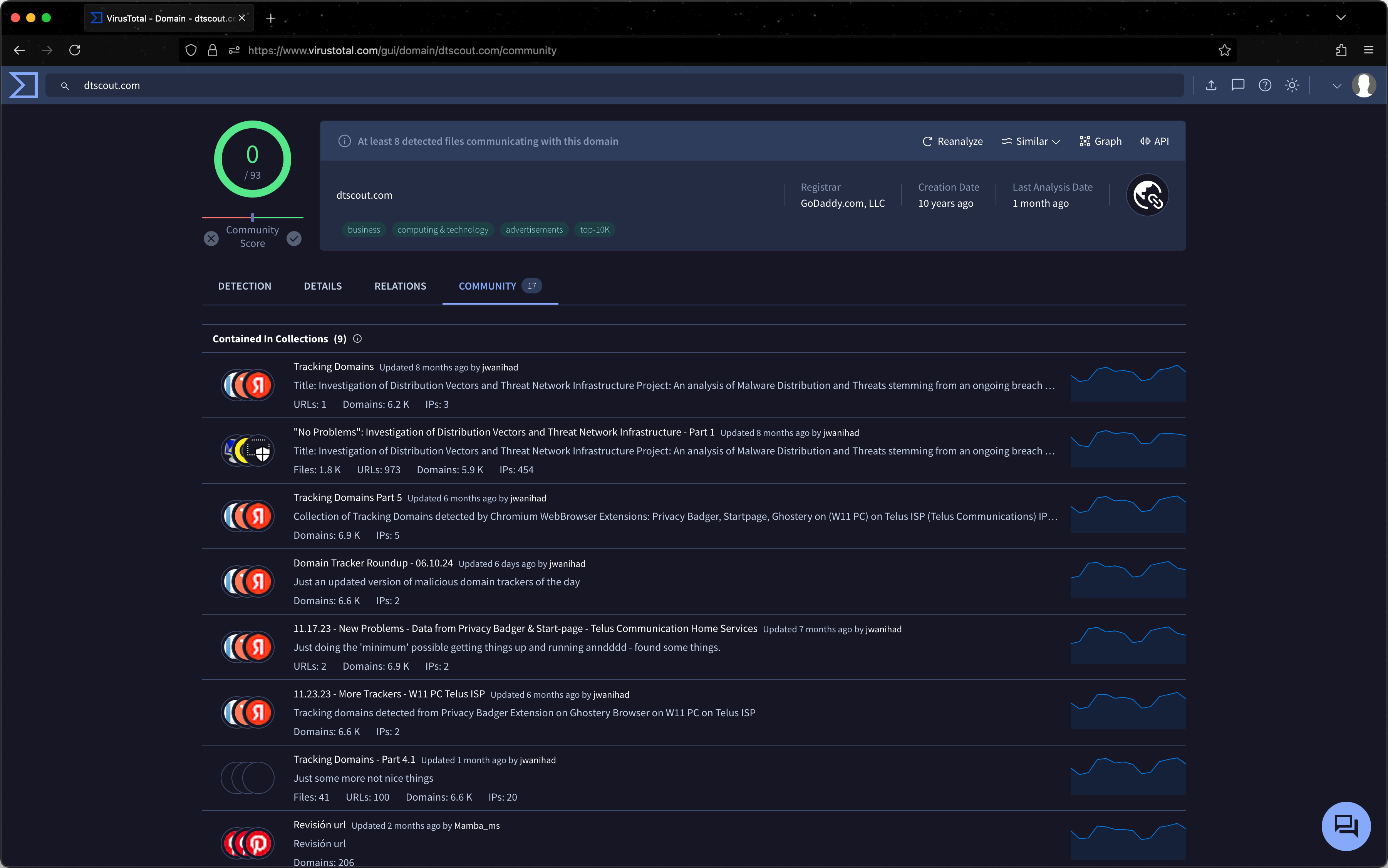
In the example above, the scan result is clean, but the community discussion suggests that dtscout[.]com is used for tracking and analytics. That does not automatically make it malware, but it does change how you should think about the domain. A clean detection score does not always mean a domain is trustworthy or appropriate to allow.
A practical way to make a decision
Here is a simple approach you can use in real situations:
- If the link is clearly malicious, block or report it
- If the link is suspicious and the purpose is unclear, do not open it
- If the link appears clean but still feels unnecessary or untrusted, avoid it anyway
- If you are checking a work-related link, ask your IT or security team before visiting it
This last point matters. In many cases, the best decision is not to prove a link is safe. It is to decide that you do not need to click it.
Quick checklist
Before opening any unfamiliar link, run through this checklist:
- Copy the URL instead of clicking it
- Scan it with VirusTotal
- Check at least one or two additional sources
- Look closely at the domain name and structure
- Read any community comments or reputation notes
- If anything still feels off, do not open it
Final thoughts
Checking suspicious links is a useful skill because most attacks do not look dramatic. They look ordinary. A fake sign-in page, a shipping notification, or a document share link can be enough to trick someone who is moving too fast.
The goal is not to become perfect. The goal is to slow down, verify what you can, and avoid giving attackers an easy win.